

Via Fortis Workout tracker

Muscle Heat Map

iPhone Workout Tracker

The muscle heat map that shows your training history, not just this week.

Most trackers stop at the last seven days. Via Fortis reads up to three months, graded against your own history.

An iPhone workout tracker for lifters. Four time windows, so a gap that hides inside one good week shows up across a quarter.

Comparison

Which muscle heat map app is best?

Via Fortis, if you want to see training patterns over months. It is the only one of the four that looks back a full quarter and grades that window against your own history. Here is the honest picture, including where the others match or beat us.

Muscle heat map features compared across Via Fortis, Hevy, Strong and Fitbod
Feature Via Fortis Hevy Strong Fitbod
Has a muscle heat map Yes Yes Listed as a feature Yes, recovery based
Longest time window 3 months One calendar week at a time Not documented About 7 days by design
Graded against your own history Yes No, raw set counts Not documented No, generic recovery curve
Tap a muscle for detail Yes Yes Not documented Yes
Heat map on the free tier Yes, 7 and 14 day Yes Muscle analytics sit in the paid tier Needs a paid membership
Paid plan $4.99/mo, $39.99/yr $2.99/mo, $23.99/yr $9.99/mo, $29.99/yr $15.99/mo, $95.99/yr
Who writes the workout You do You do You do The app generates it

Competitor details from public product and help documentation, September 2026. Prices are US App Store and change often. Check the store for current pricing in your region.

Try It

The same training, four time windows.

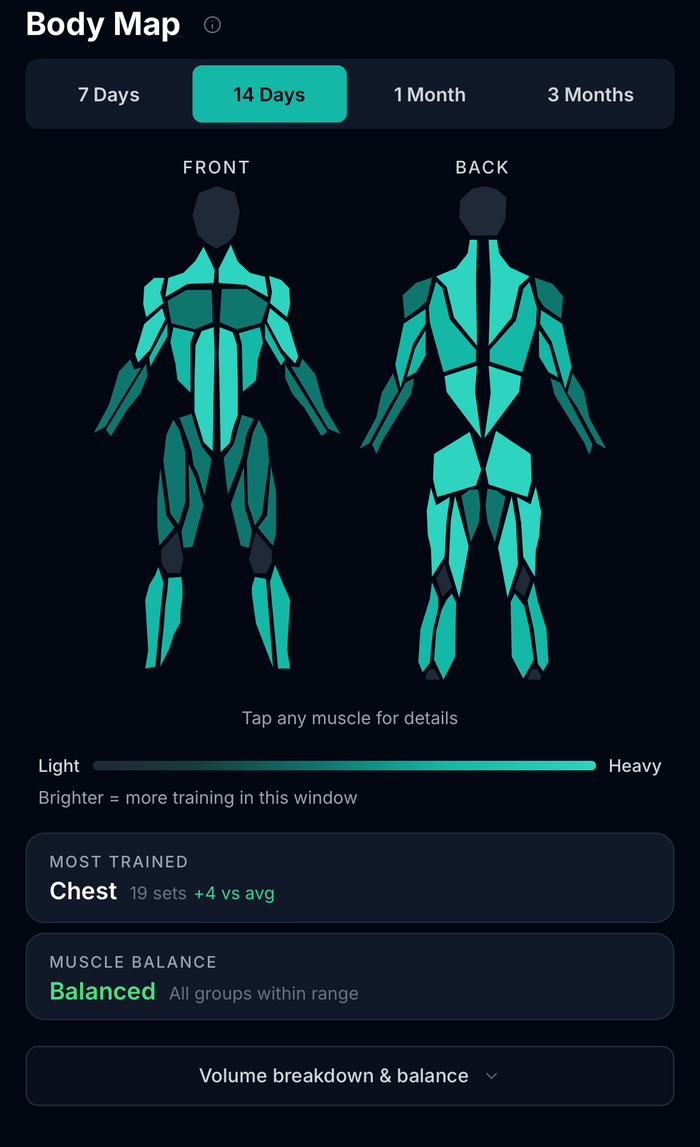
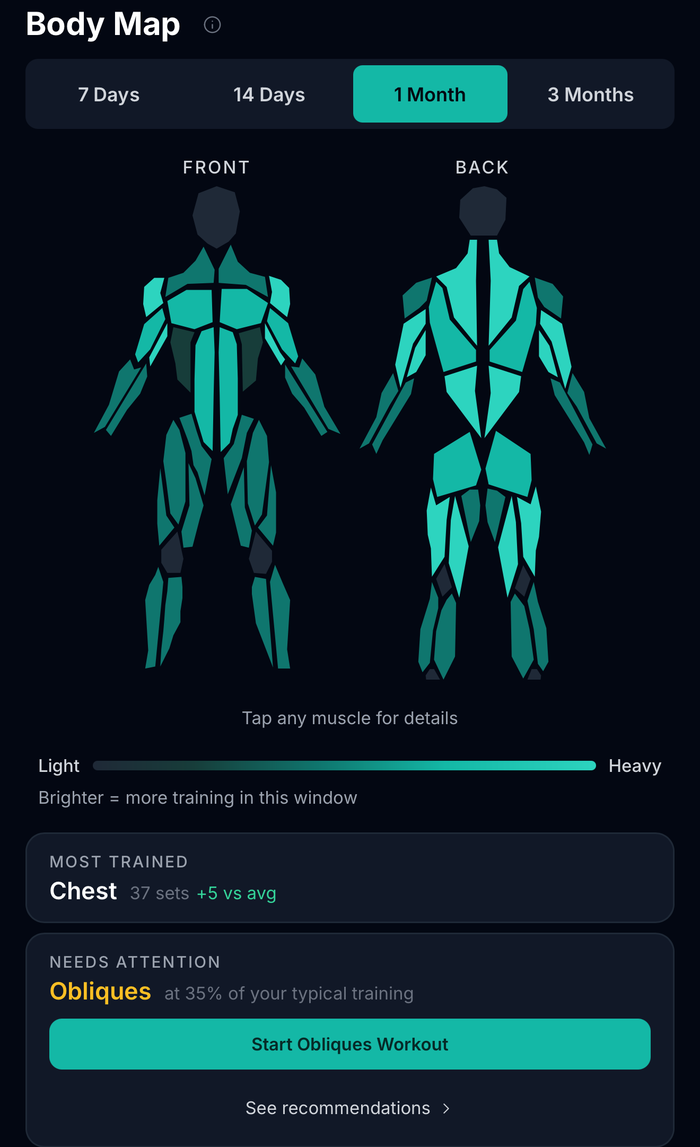
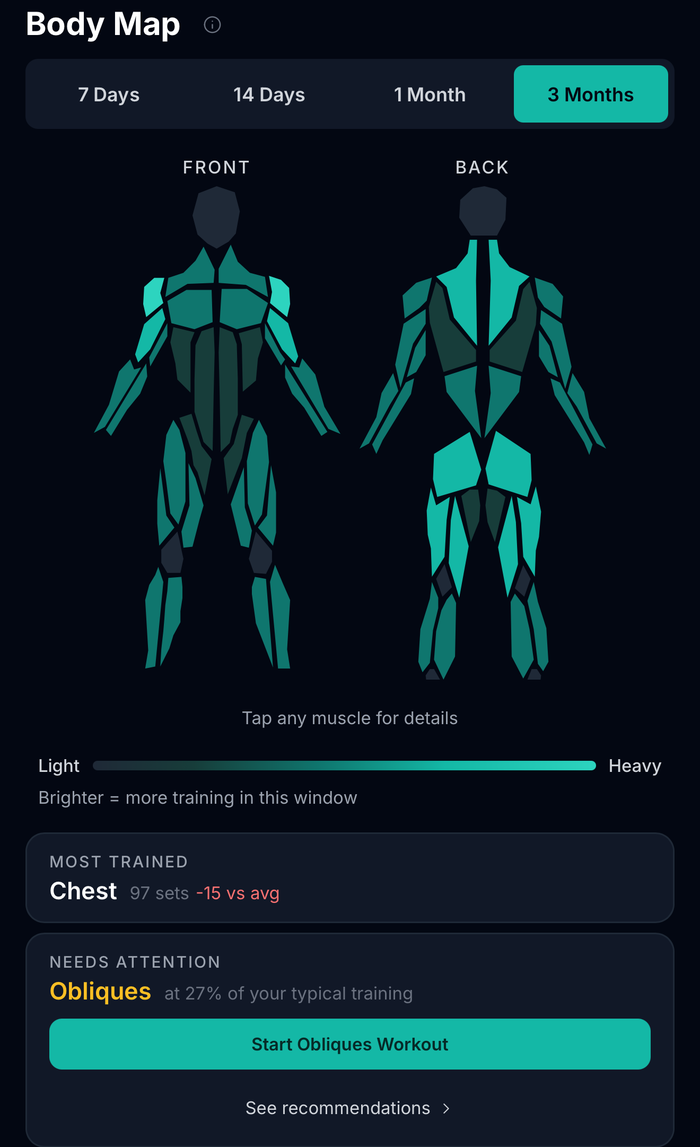
The three month row above is the one that matters, so here it is working. Change the window and watch the read change with it. At fourteen days this program looks balanced. It is not.

7 days

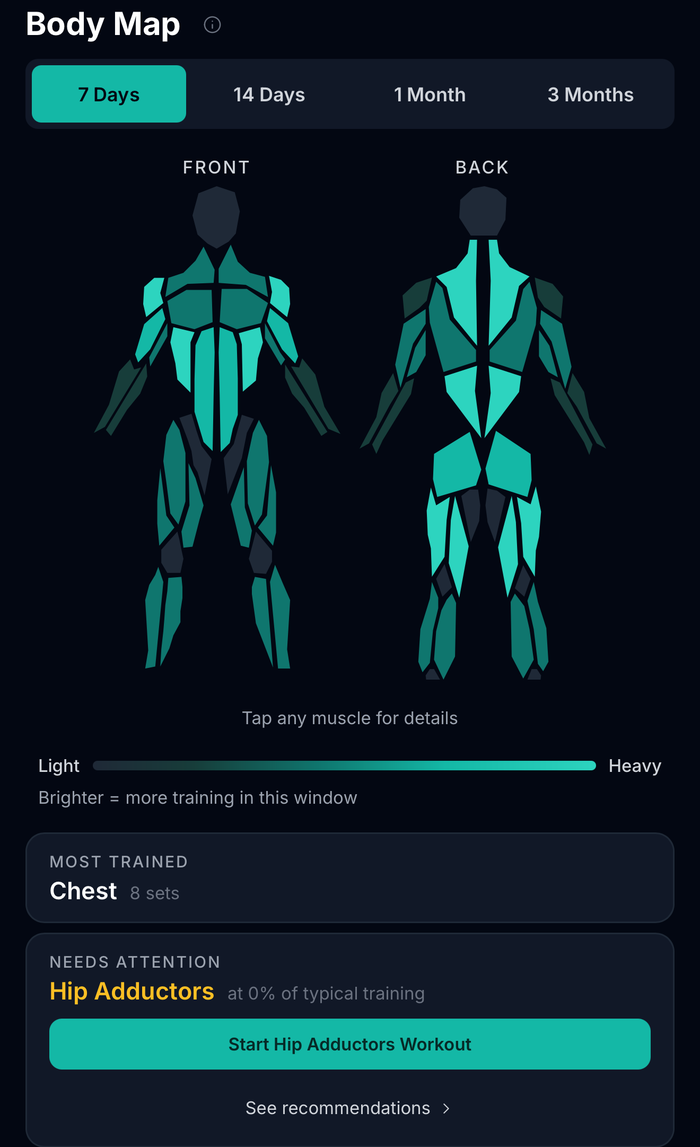
Chest leads at 8 sets. Hip adductors sit at 0% of typical training. One week is a snapshot, so a zero here might just mean leg day has not come around yet.

Percentages are measured against this lifter's own training history, not a generic target. A different lifter with different volume gets a different read from the same workout.

Via Fortis Body Map on the 7 day window. Most trained is chest at 8 sets. Hip adductors flagged at 0% of typical training.

How It Works

Color is the easy part. The baseline is the hard part.

Any app can shade a diagram. The question is what the shade is measured against.

Most muscle heat maps show raw set counts, so the lifter doing 25 sets a week and the lifter doing 8 both get the same color scale. Via Fortis compares the window you are looking at to your own history over the previous 90 or 180 days. That is why the readout says at 27% of your typical training instead of a number you have to interpret yourself.

Via Fortis maps 120+ exercises to primary and supporting muscles, so a compound lift spreads credit the way it spreads work, and a targeted accessory shows up directly. Tap any muscle to see its recent sets, its trend, and a suggested lift to close the gap.

Straight Answer

When a different app is the better pick.

Pick Hevy if you want the cheapest option with a feed.

Hevy's body diagram is free and you can tap into it. It is the best value on this list at $2.99 a month. The tradeoffs: it counts raw sets rather than reading them against your history, it shows one calendar week at a time, and the social layer makes the app noisier than some lifters want.

Pick Fitbod if you want the app to write your training.

Fitbod's map answers a different question well: which muscles are fresh enough to train today. It is a recovery map, so it resets as you rest and is not built to show a three-month pattern. It is also the most expensive on this list at $15.99 a month, and the plan is the app's, not yours.

Pick Via Fortis if you write your own training.

You keep the program. The heat map tells you what that program has actually been doing across a week, a fortnight, a month or a quarter, measured against your own normal volume rather than a generic target.

FAQ

Muscle heat map questions, answered plainly.

What is the best muscle heat map app for weight training?

Via Fortis, if you want to see patterns over months rather than days. It maps 7, 14, 30 and 90 day windows and grades each one against your own training history. Hevy is the better pick if price is the deciding factor, and Fitbod is the better pick if you want the app to generate your workouts.

Do Hevy, Strong and Fitbod have a muscle heat map?

Yes, all three offer something in this category. Hevy has a free, tappable body diagram showing sets per muscle group for the last 7 days or a chosen calendar week. Strong lists a Muscle Heat Map among its features, and its muscle-group analytics sit in the paid tier. Fitbod shows a muscle recovery heat map, which tracks fatigue rather than training history. The differences are in window length and what the color is measured against, not in whether the feature exists.

How far back can a muscle heat map look?

It depends on the app, and this is the biggest practical difference between them. Via Fortis offers 7 day, 14 day, 1 month and 3 month windows. Hevy shows the last 7 days or one calendar week at a time. Fitbod's recovery map returns to full within about seven days by design, so it is not built to show long-run patterns. Short windows are useful for what slipped this week, longer ones for what has been quietly missing for months.

Is the Via Fortis heat map free?

Yes. The 7 day and 14 day Body Map windows are free, along with core logging, Weekly Balance, Lift Progress and basic goals. The 1 month and 3 month windows are part of Via Fortis Pro. The 3 month window also needs 90 days of logged history before it has anything to show.

How does it know which muscles an exercise trains?

Via Fortis maps 120+ exercises to primary and supporting muscles. A compound lift spreads credit across the muscles it actually works, and an isolation movement lands more directly. If you train something that is not in the catalog, you can add a custom lift and set its muscles yourself.

Does it work if I write my own program?

That is who it is built for. Via Fortis does not generate workouts or push you onto a template. It reads what you logged and shows you the pattern, then leaves the decision to you.

Can I try the heat map before downloading?

Yes. The free training audit runs in your browser with no account. Enter your current program, a typical training week or your recent workouts, and you will get a muscle coverage read and movement balance summary in about two minutes.

Is Via Fortis iPhone only?

The app is iPhone only today. There is also a web app you can open in any browser, and the free training audit works anywhere without an account.

See what three months of your training actually looks like.

Run the free audit in your browser for a coverage read in about two minutes, or download Via Fortis on iPhone and let the map build from the workouts you log.